The Profitability Visibility Framework: A CFO’s Guide to Phased ERP Rollouts
Growing businesses rarely replace accounting software because the old system suddenly stops working. The pressure usually builds gradually: reporting depends on spreadsheets, inventory and customer data live in separate tools, approvals happen in email, and finance spends more time reconciling information than using it.
That is the practical signal that the business may be ready for an integrated ERP. The goal is not to replace QuickBooks or another accounting system simply because the company reached a particular revenue or headcount threshold. The goal is to remove the coordination problems that keep leadership from seeing current margins, cash commitments, inventory exposure, and operational performance.
Why a phased rollout is usually the safer starting point
A “big bang” launch attempts to replace finance, inventory, CRM, purchasing, reporting, and operational workflows at once. That approach can work when the scope, data, staffing, and testing discipline are unusually strong, but it concentrates risk into a single cutover.
A phased rollout breaks the transition into business outcomes. Each phase should produce usable visibility before the next layer is added. This makes defects easier to isolate, gives employees time to learn the new workflow, and lets leadership decide whether the implementation is delivering value before expanding the scope.
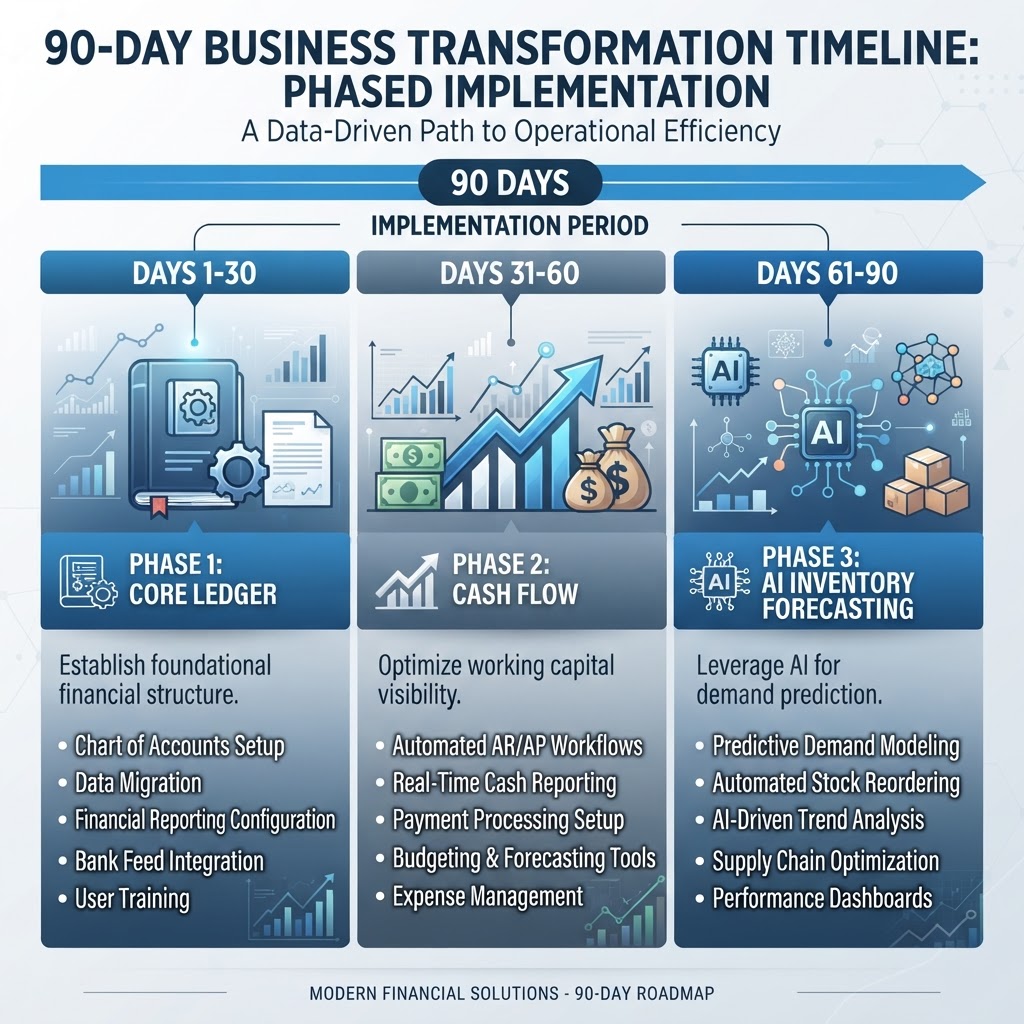
The following 90-day sequence is a planning framework, not a guaranteed implementation schedule. Actual timing depends on data quality, integrations, process complexity, regulatory requirements, staffing, and the ERP selected.
Phase 1: Establish trustworthy financial data
Begin with the chart of accounts, customer and vendor records, opening balances, permissions, approval rules, and the minimum reporting structure required to operate. Do not migrate every historical field merely because it exists. Decide which information must remain searchable, which data must be active in the new system, and which records can be retained in a read-only archive.
The first milestone is not “AI automation.” It is trustworthy data. Reconcile totals against the prior system, test permissions, document exceptions, and assign an owner to every unresolved difference. AI-assisted anomaly detection can help identify unusual entries, but a finance leader must define the thresholds and approve the resulting action.
Phase 2: Connect cash-flow workflows
Once the ledger and controls are stable, connect accounts payable, accounts receivable, billing, collections, and purchasing approvals. The purpose of this phase is to shorten the distance between an operational event and its financial effect.
Measure the workflow before automating it. How long does invoice approval take? Where are duplicate entries created? Which purchases bypass the documented process? Automation should remove repeatable friction while preserving review for exceptions, material transactions, and changes to vendor or payment information.
Phase 3: Add operational profitability
The third phase connects the operational data that explains the financial results. For an inventory business, that may include item costs, purchasing, lead times, locations, and stock movements. For a project or service business, it may include labor, job costs, utilization, milestones, or revenue recognition.
This is where an integrated ERP can move reporting from a static month-end exercise toward current decision support. A useful profitability view should let leaders trace a variance to the customer, product, project, department, or transaction that caused it. Forecasting and AI-generated explanations can assist, but they should remain transparent, reviewable, and subordinate to the organization’s accounting controls.
Define success before selecting features
A phased implementation works best when each stage has an acceptance test. Examples include:
- Opening balances and control accounts reconcile to the approved source records.
- Role permissions and approval thresholds work as documented.
- Leaders can trace dashboard totals to the underlying transactions.
- Operational teams can complete their daily workflow without maintaining a second unofficial spreadsheet.
- Exceptions have named owners, deadlines, and an audit trail.
These tests are more useful than a long feature checklist because they describe what the business must be able to trust after launch.
Choosing the right ERP path
Platform selection should follow process discovery, not precede it. Compare systems using your actual workflows, data volume, reporting requirements, integration needs, internal staffing, and implementation budget. Verify current pricing and feature availability directly with each vendor; both can change and may depend on edition, modules, users, partners, and contract terms.
Also distinguish between a native capability and an integration. An ERP may support forecasting, OCR, anomaly detection, or automated workflows through built-in tools, partner applications, or a combination of both. The implementation team should document where each function runs, which data it uses, who reviews its output, and what happens when it fails.
Visibility before autonomy
The most reliable sequence is simple: establish clean data, connect financial workflows, add operational context, and only then expand AI-assisted decision support. Automation is valuable when it reduces repetitive work without hiding the logic leaders need to audit.
Vanteliq helps growing businesses evaluate this transition and design a phased path across inventory, CRM, accounting, and operations. The right first step is not a software purchase—it is a clear picture of the decisions your current systems cannot support.
Is fragmented software limiting your view of margins and operations? Request an ERP fit assessment.